Connect your own domain
Put your website on your own domain, like example.com, with a few DNS records.
On this page
Your website already has a free subdomain. To show it on your own domain, like example.com, you add the domain in the editor, set a few DNS records where your domain is registered, and publish.
Add your domain
- At the top right of the editor, select Publish. The Publish & domains window opens.
- Under Custom domains, type your domain, like
example.comorshop.example.com. -
Select Add domain.
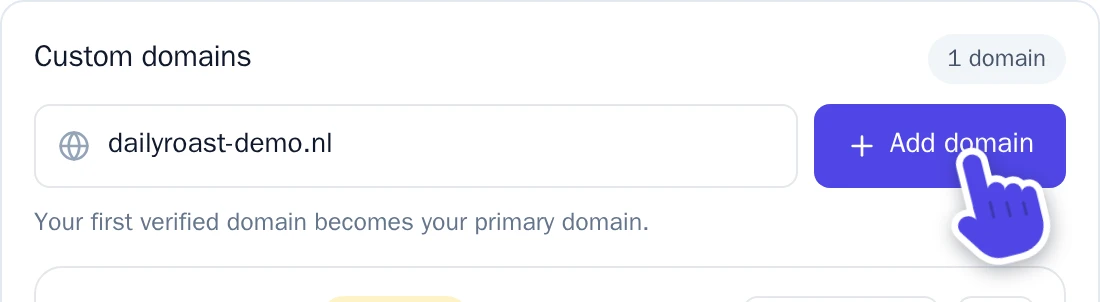
Type your domain, then select Add domain.
Your domain now shows up with the label Unverified, and under it the DNS records required.
Set the DNS records
DNS records tell the internet where your domain points. You set them where your domain is registered, in the DNS settings of your domain.
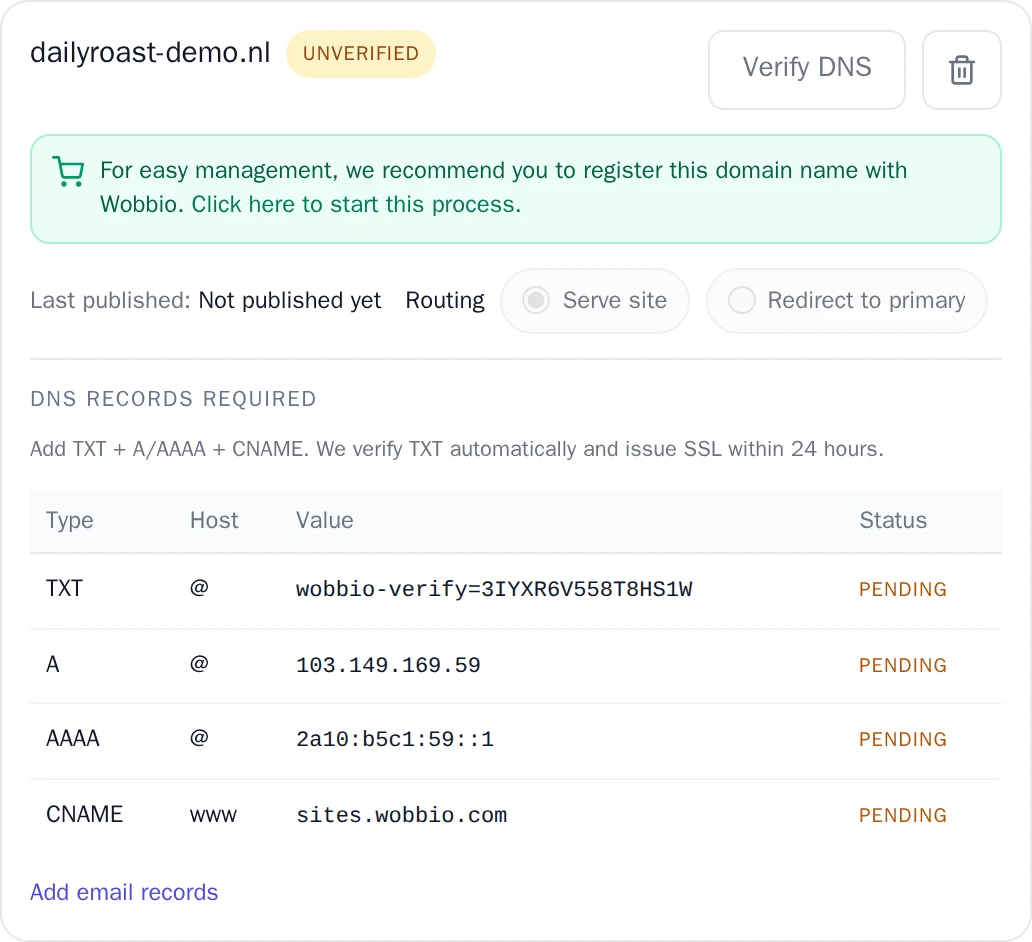
For each row in the table, add a record with the same Type, Host and Value. Copy the values from your own window: they are different for every domain.
- TXT: proves that the domain is yours.
- A and AAAA: point your domain to your website.
- CNAME for
www: makeswww.example.comwork too.
A host @ means the domain itself, without anything in front. Remove other A, AAAA or CNAME records for the same host, or visitors may end up somewhere else.
Verify your domain
Wobbio checks the records for you. To check right away, select Verify DNS next to your domain.
When everything is right, the label changes to Verified. If it doesn't yet, wait and try again: a new DNS record can take a few hours before it is found everywhere.
When the domain is verified, Wobbio sets up a secure connection (https) for it. That can take up to 24 hours.
Publish
Your own domain shows the version you publish. At the top of the window, select Publish current version. After more changes, publish again: your free subdomain always shows the newest version, your own domain only what you published.
Read more in Publish your website.
More than one domain
Your first verified domain becomes your main domain. For each other domain you choose under Routing:
- Serve site: the domain shows your website too.
- Redirect to primary: visitors go to your main domain.
To make another verified domain the main one, select Make primary.
No domain yet?
At the bottom of the Publish & domains window, select Search domain names to register a new domain or to transfer one you already have to Wobbio. A domain registered with Wobbio gets its DNS records automatically. Read more in Register or transfer a domain with Wobbio.